First Control
Controls are the central piece of Simple Shader Inspectors, so it's only natural that at some point you may need to make your own controls if you're doing something particular with your shader and you want an user friendly way to control it in the inspector.
And luckily making a customized control is not too hard.
Caution
Unlike just using the API, making custom controls will require you to have a basic knowledge on how to manually display stuff in the inspector using MaterialPropertyand MaterialEditor, how the IMGUI systems works.
First things first, let's look at an empty template:
using UnityEditor;
using UnityEngine;
using VRLabs.SimpleShaderInspectors;

namespace TestControlNamespace
{
    public class MyCustomControl : PropertyControl
    {
        public MyCustomControl(string propertyName) : base(propertyName)
        {
        }
        protected override void ControlGUI(MaterialEditor materialEditor)
        {
        }
    }
}
As we can see the class MyCustomControl inherits from PropertyControl, which is the base class for all controls that use one material property.
Note
You can inherit from other controls as well if you want to inherit some of their specific functionalities.
Caution
If you want to make a control that doesn't use any material property, the base class should be SimpleControl.
PropertyControl also inherits from this class.
When inheriting from PropertyControl you will always need to override the ControlGUI method.
This method is what gets called each time the inspector has to draw your control, therefore all the GUI stuff goes there.
The constructor should always call the base constructor to correctly initialize the PropertyName string (you can initialize it manually if you want, it's just simpler to pass the string to the base constructor).
After that, you're free to do whatever you want with the constructor.
Let's start customize it to our needs, we will make a control that will only take 1 texture and diplays it, but also had an additional label in the row below for a longer description.
To do that we need an additional string containing the text we wanna show:
public class MyCustomControl : PropertyControl
{
    public string ExtraText { get; protected set; }
Tip
We have the set as protected cause we don't want it be modified from the outside, but we still want to it to be usable if someone will ever inherit from this control.
Now we need the constructor to initialize the label as well.
public MyCustomControl(string propertyName, string extraText) : base(propertyName)
{
    ExtraText = extraText;
}
Now we need to draw them in the ControlGUI method:
protected override void ControlGUI(MaterialEditor materialEditor)
{
    EditorGUI.BeginChangeCheck();
    materialEditor.TexturePropertySingleLine(Content, Property);
    HasPropertyUpdated = EditorGUI.EndChangeCheck();
    GUILayout.Label(ExtraText);
}
As you see, we did not fetch the material property, cause it gets automatically fetched for us by the inspector, so we get right to the draw part and we do a BeginChangeCheck so that everything we do next will be tracked for changes. Then we draw our texture property, end the change check assigning the result to HasPropertyUpdated, and draw our additional label.
You can see that we use the Content field inherited from PropertyControl as a label for our texture. This is cause the localization system fetched the localized control string for us, so we don't need to worry about it.
Note
In this example the additional label uses a predefined string, this is not optimal if we will have multiple localizations, here we will revisit the control to add support for another localized string.
As a final touch let's make the user able to decide whether or not he wants to display the additional label:
public string ExtraText { get; protected set; }
public bool IsExtraLabelVisible { get; set; }
public MyCustomControl(string propertyName, string extraText, bool isExtraLabelVisible = true) : base(propertyName)
{
    ExtraText = extraText;
    IsExtraLabelVisible = isExtraLabelVisible;
}
Note
Doing bool isExtraLabelVisible = true makes so the parameter is not required to make the method call, and if the parameter is not given a default value is used instead (in this case true).
protected override void ControlGUI(MaterialEditor materialEditor)
{
    EditorGUI.BeginChangeCheck();
    materialEditor.TexturePropertySingleLine(Content, Property);
    HasPropertyUpdated = EditorGUI.EndChangeCheck();
    if (IsExtraLabelVisible)
    {
        GUILayout.Label(ExtraText);
    }
}
Adding the New Control extension method
At this state, the control technically already works, but it's a fairly different experience using this compared to the default ones, since we have to manually call the constructor and assign the control to the list in the inspector.
This is because there are no Extension methods to create and assing the control.
Simple Shader Inspectors comes with a tool that will automatically generate all chainable methods required from a namespace, and saves it into a class. It can be found at VRLabs/Simple Shader Innspectors/Generate Chainable Methods.
Once opened you will need to select where you want to save the generated files and which namespace should be looked for:
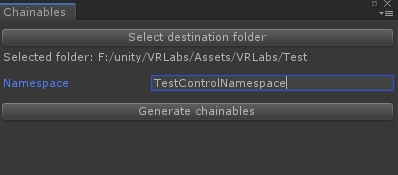
The tool will generate all chainable constructors and methods for all controls inside the selected namespace and subnamespaces.
Making a Property chainable
Usually you want the extension method to exactly match the constructor parameters, but in our case we did not put the boolean for the label. This is intentional, cause now we're gonna move that boolean out of the constructor and add a chainable attribute to the property definition.
public string ExtraText { get; protected set; }
[Chainable]
public bool IsExtraLabelVisible { get; set; }
public MyCustomControl(string propertyName, string extraText) : base(propertyName)
{
    ExtraText = extraText;
    IsExtraLabelVisible = true;
}
By adding the Chainable attribute you're telling the generator script to also generate a chainable method for this property (you will need to run the generator script again).
Now the question is: when should a field be initialized with a parameter in the constructor vs having an extension method?
It depends, on classes that are not meant to have child classes or has fields where it's required to have a value different from a default in order to work, then initializing them with a dedicated parameter in the constructor makes sense, in other cases you may just give a default value to it in the constructor and let the user decide if he wants to modify it by calling an extension method.
You can also have both at the same time, if you so desire.
Final example class
using UnityEditor;
using UnityEngine;
using VRLabs.SimpleShaderInspectors;

namespace TestControlNamespace
{
    public class MyCustomControl : PropertyControl
    {
        public string ExtraText { get; protected set; }
        [Chainable]
        public bool IsExtraLabelVisible { get; set; }

        public MyCustomControl(string propertyName, string extraText) : base(propertyName)
        {
            ExtraText = extraText;
            IsExtraLabelVisible = true;
        }

        protected override void ControlGUI(MaterialEditor materialEditor)
        {
            EditorGUI.BeginChangeCheck();
            materialEditor.TexturePropertySingleLine(Content, Property);
            HasPropertyUpdated = EditorGUI.EndChangeCheck();
            if (IsExtraLabelVisible)
            {
                GUILayout.Label(ExtraText);
            }
        }
    }
}